How to setup the integration between Xledger and BDO’s data warehouse. You only need to do these steps once.
1. Check the organization number.
To be able to establish the integration the organization number that appears in Xledger must correspond with the number in Brønnøysundregisteret. In the case that the organization numbers do not correspond, request Xledger to change it.
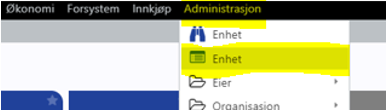
To find the organization number in Xledger click “Administrasjon> Enhet”. The organization number will appear to the right in the table.
2. Grant access.
Click “Administrasjon > Tilgangskontroll > Lokale tilganger” to give BDO access to the unit (or the corporate entity).
BDO has created a user for integration at Xledger with the following username: Audit_integration_xledger@bdo.no
You can search for this user under “Lokale tilganger”: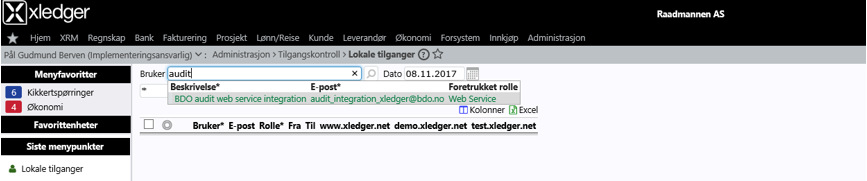
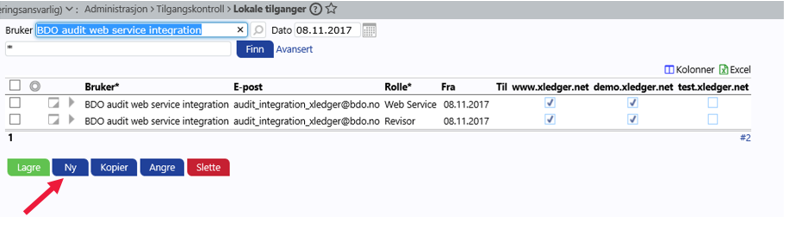
The role of the new user must be set to “Revisor” and “Web Service”. To manage the roles, click “Ny” and register a user for each of the roles:
3. Grant Web Service access.
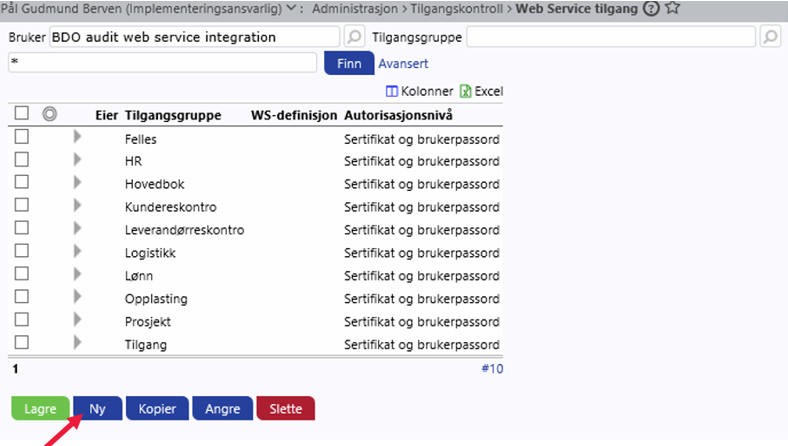
To grant the new user (audit_integration_xledger@bdo.no) access to Web Service click “Administrasjon > Tilgangskontroll > Web service tilgang”. Grant access to all groups by clicking “Ny” for each access group.
4. Under Administrasjon > Enhet you can find the “Eier-ID”.
Save your “Eier-ID” and your company’s organization number in a document. Attach the file in the window below, type in your e-mail address and click “Send”.